• Home
  • Products
  • Training
  • Support
  • About Us
  • Forum
  • Sign In

Manage your storage devices

Discover
  • Find files faster
  • Search within files
  • Search for E-mails
  • Recover deleted files
  • Uncover User Activity
  • Collect system information
  • Password recovery
  • Hidden Disk Areas - HPA/DCO
  • Volume Shadow Copy
  • Web Browser
Identify
  • Verify and match files
  • Find misnamed files
  • Compare drive signatures
  • Timeline viewer
  • File viewer
  • Memory viewer
  • Binary String Extraction
  • Email viewer
  • Registry viewer
  • File system browser
  • Raw disk viewer
  • Thumbnail cache viewer
  • SQLite database browser
  • ESE database browser
  • Prefetch viewer
  • $UsnJrnl viewer
  • Plist viewer
  • Event Log Viewer
  • Web Server Log Viewer
Manage
  • Case management
  • Generate reports
  • Storage device management
  • Drive Imaging
  • Cloud Drive Imaging
  • Cloud Account Imaging
  • Rebuild RAID arrays
  • Portability
  • Secure case logging
  • Support

OSForensics™ helps you manage your physical disks, partitions, volumes and image files within a case. Once the device is added to the case, it can be accessed across all OSForensics functionality via a user-defined alias (similar to a drive letter in Windows).


OSForensics supports the following storage devices:

  • Windows volumes (ie. drive Letter)
  • Physical disks and partitions
  • Image files
  • Network Path (UNC)
  • Volume Shadow Copy
  • BitLocker Encryption

Image files added to the case must be one of the supported image formats.
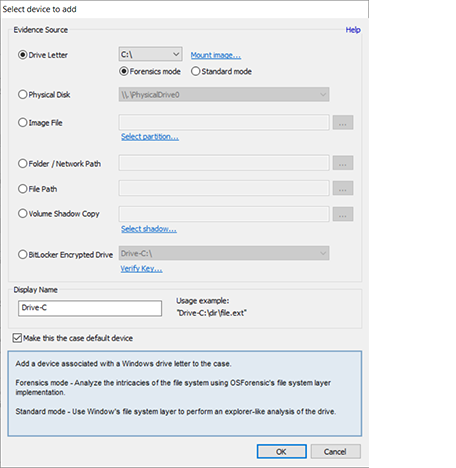
Add Storage Device

Home
Discover Identify Manage
Contact Us Legal Disclaimer Privacy Policy
Products
OSForensics OSForensics Bootable (USB Flash Drive) Rainbow Tables - 3TB hard disk
Training
Online Training Course Certification Exam - Online Triage Exam - Online Face-to-Face Classes 2024 Events Calendar
Support
Video Demonstrations FAQs and Tutorials OSForensics Forums Australian Head Office North American Branch

Copyright © 2025 PassMark™ Software