• Home
  • Products
  • Training
  • Support
  • About Us
  • Forum
  • Sign In

Find files faster

Discover
  • Find files faster
  • Search within files
  • Search for E-mails
  • Recover deleted files
  • Uncover User Activity
  • Collect system information
  • Password recovery
  • Hidden Disk Areas - HPA/DCO
  • Volume Shadow Copy
  • Web Browser
Identify
  • Verify and match files
  • Find misnamed files
  • Compare drive signatures
  • Timeline viewer
  • File viewer
  • Memory viewer
  • Binary String Extraction
  • Email viewer
  • Registry viewer
  • File system browser
  • Raw disk viewer
  • Thumbnail cache viewer
  • SQLite database browser
  • ESE database browser
  • Prefetch viewer
  • $UsnJrnl viewer
  • Plist viewer
  • Event Log Viewer
  • Web Server Log Viewer
Manage
  • Case management
  • Generate reports
  • Storage device management
  • Drive Imaging
  • Cloud Drive Imaging
  • Cloud Account Imaging
  • Rebuild RAID arrays
  • Portability
  • Secure case logging
  • Support

OSForensics™ provides one of the fastest and most powerful ways to locate files on a Windows computer. You can search by filename, size, creation and modified dates, and other criteria.

Results are returned and made available in several different useful views. This includes the Timeline View which allows you to sift through the matches on a timeline, making evident the pattern of user activity on the machine.

How fast?

OSForensics file search is many times faster than the search built into Windows. And unlike Windows which will often omit and miss files, you can be sure that OSForensics will find every file on your disk.

Search contents of files

OSForensics can also search the content of files and return results almost instantaneously after indexing. It is able to search within most common file formats and it is powered by Wrensoft's robustly accurate Zoom Search Engine.

Timeline View

Timeline view is an interactive bar graph that provides you with a visual view of the distribution of files with respect to file creation dates. Read More about Timeline Viewer »

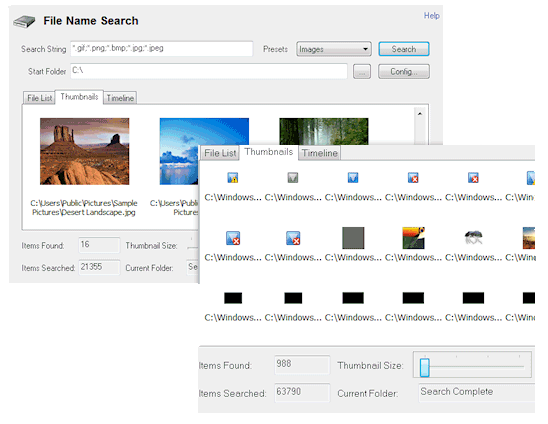
Thumbnail View

Thumbnail view is useful when searching for media files, allowing you to quickly browse through thumbnail images, which you can vary the size of on-the-fly by adjusting the slider bar.
Home
Discover Identify Manage
Contact Us Legal Disclaimer Privacy Policy
Products
OSForensics OSForensics Bootable (USB Flash Drive) Rainbow Tables - 3TB hard disk
Training
Online Training Course Certification Exam - Online Triage Exam - Online Face-to-Face Classes 2026 Events Calendar
Support
Video Demonstrations FAQs and Tutorials OSForensics Forums Australian Head Office North American Branch

Copyright © 2025 PassMark™ Software