• Home
  • Products
  • Training
  • Support
  • About Us
  • Forum
  • Sign In

Manage your Investigation

Discover
  • Find files faster
  • Search within files
  • Search for E-mails
  • Recover deleted files
  • Uncover User Activity
  • Collect system information
  • Password recovery
  • Hidden Disk Areas - HPA/DCO
  • Volume Shadow Copy
  • Web Browser
Identify
  • Verify and match files
  • Find misnamed files
  • Compare drive signatures
  • Timeline viewer
  • File viewer
  • Memory viewer
  • Binary String Extraction
  • Email viewer
  • Registry viewer
  • File system browser
  • Raw disk viewer
  • Thumbnail cache viewer
  • SQLite database browser
  • ESE database browser
  • Prefetch viewer
  • $UsnJrnl viewer
  • Plist viewer
  • Event Log Viewer
  • Web Server Log Viewer
Manage
  • Case management
  • Generate reports
  • Storage device management
  • Drive Imaging
  • Cloud Drive Imaging
  • Cloud Account Imaging
  • Rebuild RAID arrays
  • Portability
  • Secure case logging
  • Support

OSForensics™ helps you to organize all the evidence you have discovered into a single, cyptographically-secure case file. Add evidence and results to your case file for future analysis and have confidence that your case file has not been tampered with.

Case Management

Cases enable you to aggregate and organize results and case items from OSForensics' other discovery and idenfitication functions, such as File Search, File Mismatch Search, User Activity, Deleted Files and more. Once a case file has been created or opened, case items such as lists and files can be directly opened or deleted by the investigator for fast access.

When creating a case, OSForensics lets you enter in custom fields, load templates, and use the HTML editor to write up a case narrative.
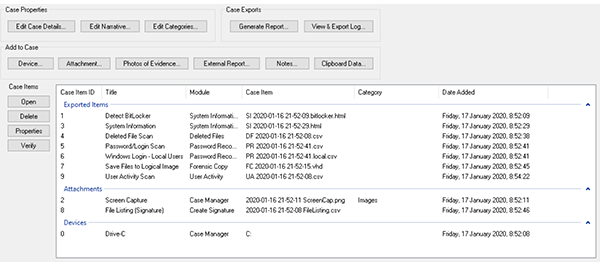
Organize your findings into a case file for ease of retrieval and security.

Configure and add items to the current case quickly and easily. Edit case details, generate reports, generate reports, add external reports, add evidence photos, and add devices all from within the case management tab.
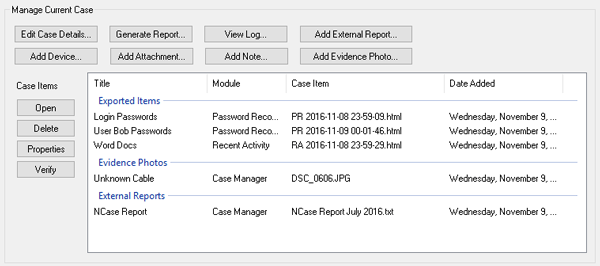
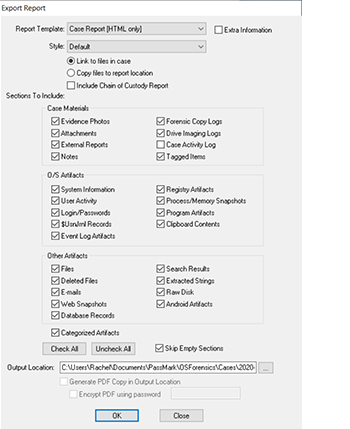
Organize your findings into a case file for ease of retrieval and security.

Organize your findings into a case file for ease of retrieval and security.

Home
Discover Identify Manage
Contact Us Legal Disclaimer Privacy Policy
Products
OSForensics OSForensics Bootable (USB Flash Drive) Rainbow Tables - 3TB hard disk
Training
Online Training Course Certification Exam - Online Triage Exam - Online Face-to-Face Classes 2024 Events Calendar
Support
Video Demonstrations FAQs and Tutorials OSForensics Forums Australian Head Office North American Branch

Copyright © 2025 PassMark™ Software